If you've ever had to deal with a physical SIM card, then you're all too familiar with its limits. From having to wait in line at airports, to setup hassle and easy misplacement, the physical SIM card can cause frustration. That's where eSIMs come in.
eSIMs are digital SIMs that you can download directly to your phone. eSIMs help you stay connected on the go more smoothly, but like any new technology, you may need some guidance to get started. In this article, we'll take you through 3 simple steps to install and connect your Airalo eSIM.
In this article:
What Are the Benefits of Using an Airalo eSIM?

eSIMs have many benefits over traditional SIM cards, such as instant travel connectivity and more. Using an eSIM from Airalo comes with many benefits, including:
- No roaming fees. Airalo eSIMs are prepaid. Pay only for the data you need, and say goodbye to surprise roaming fees.
- You aren't tied to a specific carrier. You can choose the eSIM data package that best suits your needs and easily switch packages when you travel.
- You can connect like a local. Airalo works with local providers to ensure you get the best prices and service during your trip.
- Contact us 24/7. Our support team is available 24/7, so you can get the assistance you need, no matter your time zone.
Prepare for Your Airalo eSIM Setup

Before you install and activate your eSIM, check that your device is:
- Carrier-unlocked
- eSIM Compatible
- Connected to Wi-Fi
Read on for more information or jump to Step 1.
1) Ensure Your Phone is Unlocked
Carrier-unlocked means that your device isn't tied to a contract with a mobile carrier. If you're unsure, we recommend calling your carrier to confirm or checking your device's settings.
Here's how to do it on iPhone:
- Go to your iPhone's Settings.
- Tap General.
- Tap About.
- Scroll down to Carrier Lock or Network Provider Lock.
- Check the status there.
- If your iPhone is unlocked, its status will be No SIM restrictions. If it's locked, you'll see your carrier's name.
Settings will look different based on your Android model, but generally will look like this:
- Open Settings.
- Tap Network & Internet, Connections, or a similar menu option.
- Tap SIMs, Mobile Network, or a similar option.
- You'll then be able to choose a network/SIM or select network operators for further choices. If you see more than one network to choose from or options to manage your SIMs, this likely indicates that your phone is unlocked.
2) Check if Your Phone is eSIM-Compatible
Whether your phone is eSIM-compatible depends on the model and where it was manufactured, not just the year it was released. While many newer smartphones support eSIM technology, this isn't guaranteed.
Some phones only support eSIM technology in certain regions, while others may have different hardware depending on the market they were made for. For example, two phones with the same name can have different eSIM capabilities, depending on the country in which they were manufactured.
Before purchasing an eSIM, we strongly recommend verifying that your phone is eSIM-compatible, which means it supports the storage of digital SIMs. Here are a few ways you can do this:
Method 1: Settings Check
- Open Settings on your phone.
- Navigate to your SIMs (under Mobile/Cellular Networks or similar).
- Look for an Add eSIM or Download SIM option. You might have to select a SIM before you see the option.
- If it's there, you're eSIM-ready.
Note: Instructions vary based on your phone model. If you struggle to find the Add eSIM/or Download eSIM option, use your phone's search function.
Method 2: IMEI and EID Check
- Dial *#06# on your phone.
- If you see two IMEI numbers, your phone likely supports dual-SIMs (physical and eSIM).
- Note down the IMEI and check with your carrier.
- Alternatively, if an EID appears, your phone supports eSIM.
Method 3: Manual Check
- Check your phone's original packaging or documentation. If it's available, eSIM support is usually listed in the technical specifications.
- You can also check Airalo's regularly updated eSIM compatibility list here.
Method 4: Quick Dial Code (Android only)
- Open your phone app.
- Dial ##4636##.
- On most Android phones, this opens a hidden menu that allows users to view and modify network settings.
- From this menu, select Phone Information.
- Look for an eSIM or embedded SIM status.
Note: You can still purchase an eSIM if your phone isn't eSIM compatible. You'll have the option to share the eSIM to another device, rather than install it on your phone.
3) Connect to Wi-Fi Before Installing Your eSIM
We always recommend that you connect to a stable Wi-Fi network when installing your eSIM. This is because eSIMs can only be installed once, and an unstable connection can cause the installation to fail.
We generally recommend doing so before leaving for your trip, so that you can get connected upon landing. Most eSIM's validity period only starts when the eSIM connects to the mobile network in its coverage area, so that you won't lose precious data.
Pro tip: Check an eSIM's validity policy by selecting Package details before or after purchase. This will let you know if the eSIM's validity period starts when it connects to a network, or more rarely, upon installation.
Now that you've got the basics down, it's time to buy and install your eSIM.
Step 1: Buy an eSIM
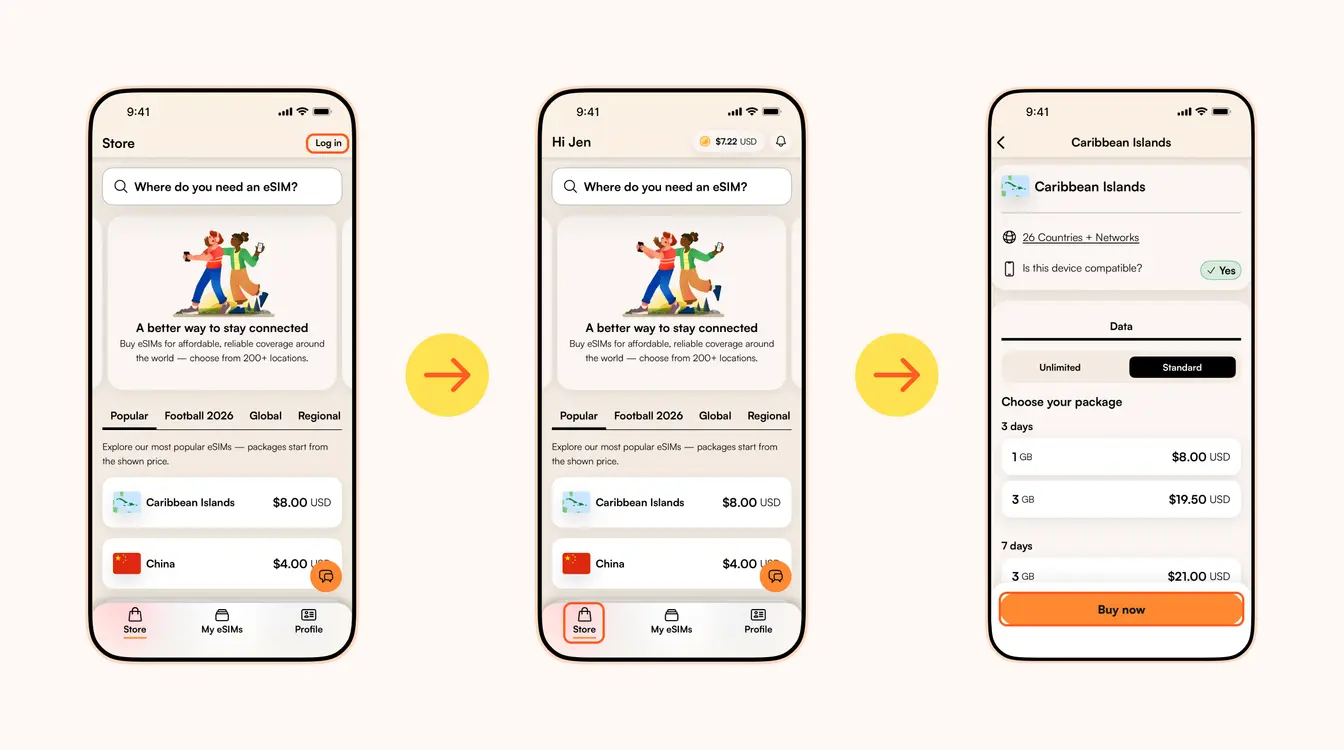
如果您曾经使用过实体 SIM 卡(我们相信您曾经使用过),那么您就会知道切换到 eSIM 是多么棒。 从旅行时的即时连接到简便的安装和激活步骤,还有什么不喜欢的呢?
像 Airalo 这样的 eSIM 提供商(是的,就是我们!)可帮助您随时随地保持联系。 我们省去了使用 SIM 卡的麻烦,为您提供全球 200 多个国家和地区的即时连接。
与任何新技术一样,您可能需要一些帮助才能开始使用。 在本文中,我们将引导您完成安装和激活 Airalo eSIM 的步骤。
请参考以下内容
- 如何通过四个步骤安装和激活 Airalo eSIM
- 安装 eSIM
- 激活 eSIM
- 本地、区域和全球 eSIM
- 使用 Airalo eSIM 的好处
- 关于 Airalo eSIM 的常见问题 (FAQ)
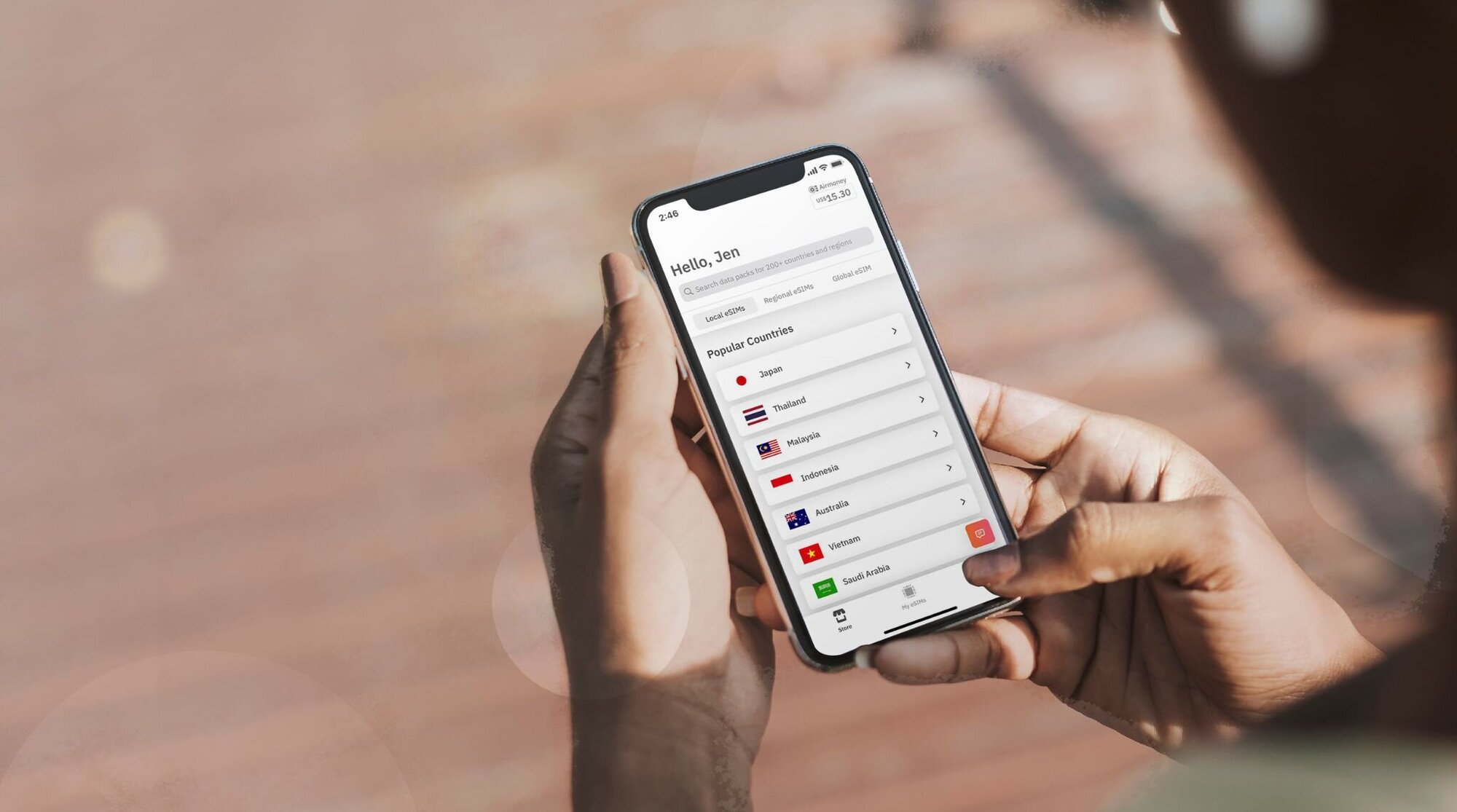
如何通过 4 个步骤激活 Airalo eSIM
在安装和激活 eSIM 之前,请确保您的设备:
- 运营商解锁。这意味着您的设备不受移动运营商合同的约束。 如果您直接购买了设备,没有任何移动服务协议,那么您的设备很可能已被解锁。 如果您不确定,我们建议您致电您的运营商进行仔细检查!
- 兼容 eSIM。如果您拥有 2018 年或之后生产的智能手机,那么您的手机很可能支持 eSIM。 查看我们全面的eSIM 兼容设备列表,看看您的手机是否包含在内。
现在您已确认您的设备已由运营商解锁,并且支持 eSIM,现在是时候按照这四个简单的步骤来安装和激活您的 eSIM 了!
步骤 1:购买 eSIM
首先,您需要购买一张 eSIM。 方法如下:
- 前往Airalo 网站或下载 Airalo 应用程序(适用于iOS和Android)。
- 为您要前往的目的地选择一张 eSIM。
- 请考虑您所需的数据量、eSIM 的有效期及其价格等因素。
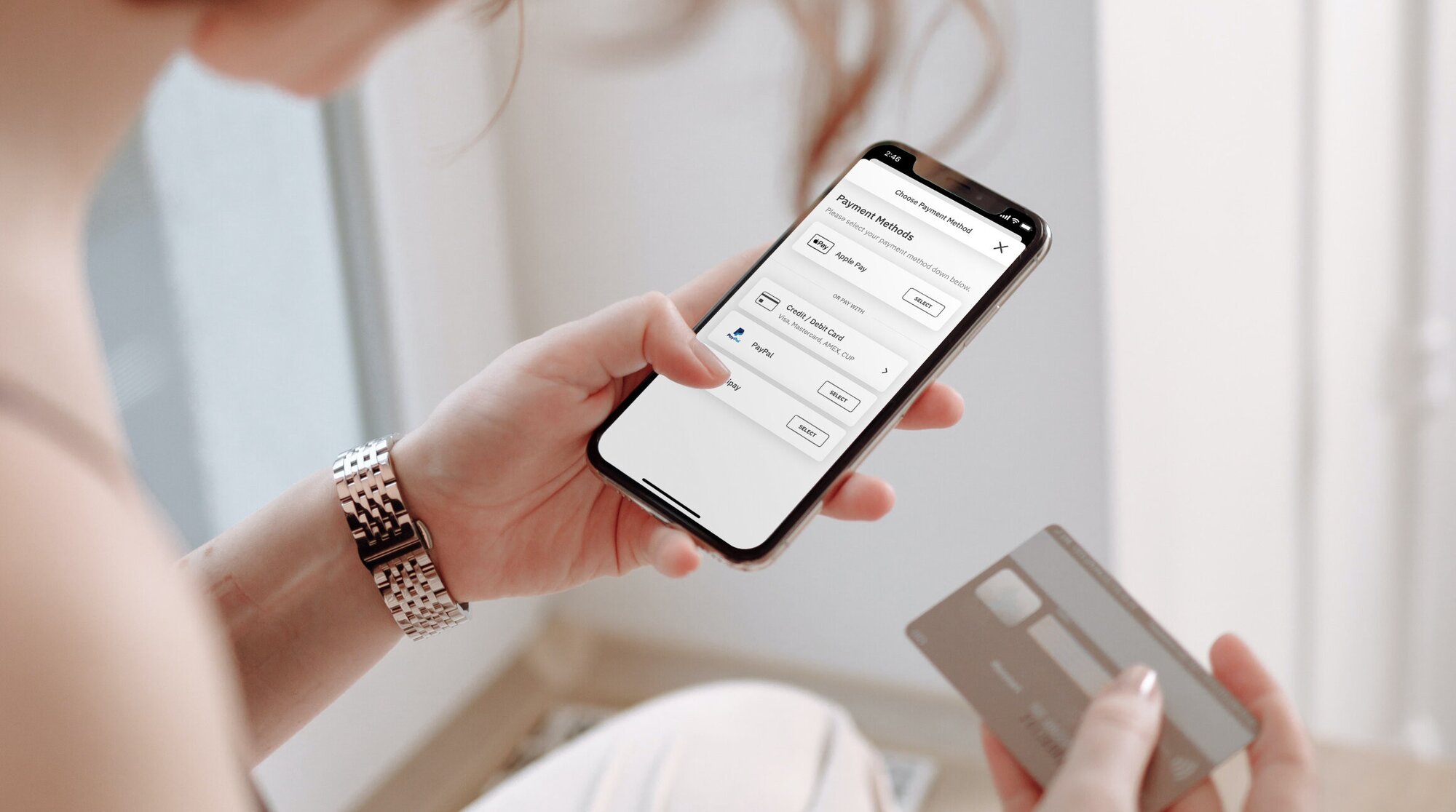
第 2 步:安装 eSIM
购买 eSIM 后,您需要将其安装到您的设备上。 在开始安装过程之前,请确保您拥有稳定的 Wi-Fi 连接。
以下是安装 Airalo eSIM 的三种不同方法:
- 直接:点选 Airalo 应用程序并按照分步提示安装您的 eSIM。
- QR 码:扫描二维码开始安装过程。
- 手动:在设备的“设置”部分手动输入您的 eSIM 详细信息。
有关如何安装 eSIM 的更多详细信息,请按照以下链接中概述的步骤操作:
当您按照安装步骤操作时,系统将提示您标记您的 eSIM。 例如,如果您正在访问埃及,您可以将您的线路标记为“埃及 eSIM”,以区分您的主 SIM 卡和 eSIM 。 它使生活变得更加轻松——尤其是当您使用 SIM 卡拨打电话和发短信,并使用 eSIM 传输数据时。

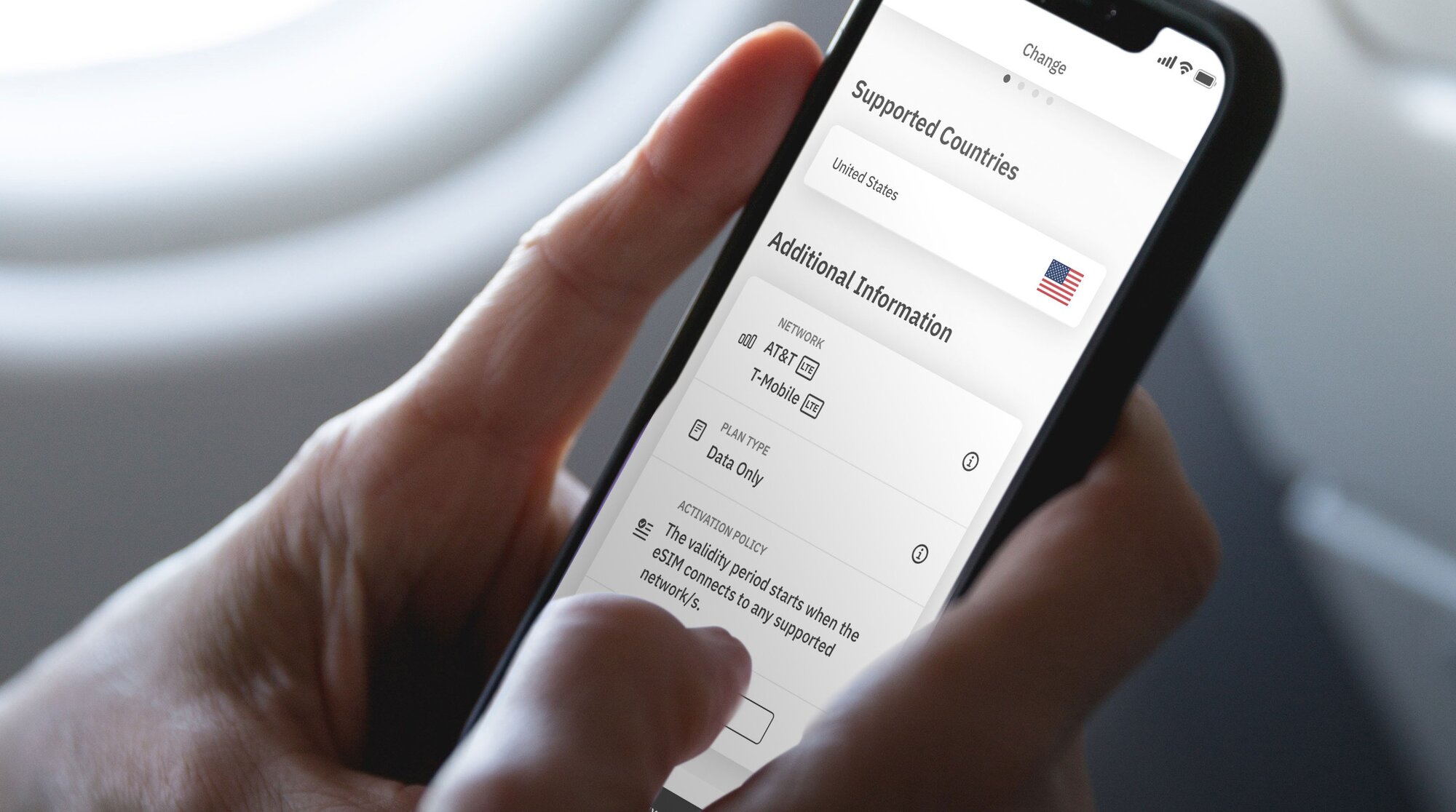
步骤 3:激活您的 eSIM
您的 eSIM 的激活政策会告诉您其有效期何时开始。 eSIM 激活策略有两种类型:
- 当您连接到支持的网络时激活的 eSIM。 当您打开 eSIM 线路并连接到目的地支持的网络时,大多数 eSIM 都会激活。 一旦连接,您的有效期将开始,并且您可以开始使用您的 eSIM 数据。
- 安装时激活的 eSIM。 一些 eSIM 将在安装后立即激活——即使您还没有离开家。 对于立即激活的 eSIM,我们建议您在旅行前安装它们,以便您可以充分利用 eSIM 数据。
您可以在 eSIM 的附加信息部分找到激活政策:
- 打开 Airalo 应用程序。
- 选择您想要购买的 eSIM。
- 点击 立即购买查看其详细信息(不用担心,您暂时不需要购买 eSIM)。
- 向下滑动至附加信息。
- 阅读激活政策。
步骤 4:连接到当地网络
现在您了解了两种 eSIM 激活策略,让我们回顾一下打开 eSIM 线路并连接到当地网络的步骤。
以下是在 iPhone 上开启 eSIM 线路的方法:
- 前往设置。
- 点击蜂窝网络.
- 点击您的 eSIM 线。
- 请打开此线路。
- 开启“数据漫游”
- 点击网络选择并选择支持的网络(您可以在 eSIM 的附加信息部分找到网络列表)。
在安卓上如何操作:
- 前往设置。
- 点击网络互联网。
- 点击移动网络.
- 打开您的 eSIM。
- 打开移动数据。
- 开启“数据漫游”
- 点击网络选择并选择支持的网络(您可以在 eSIM 的附加信息部分找到网络列表)。
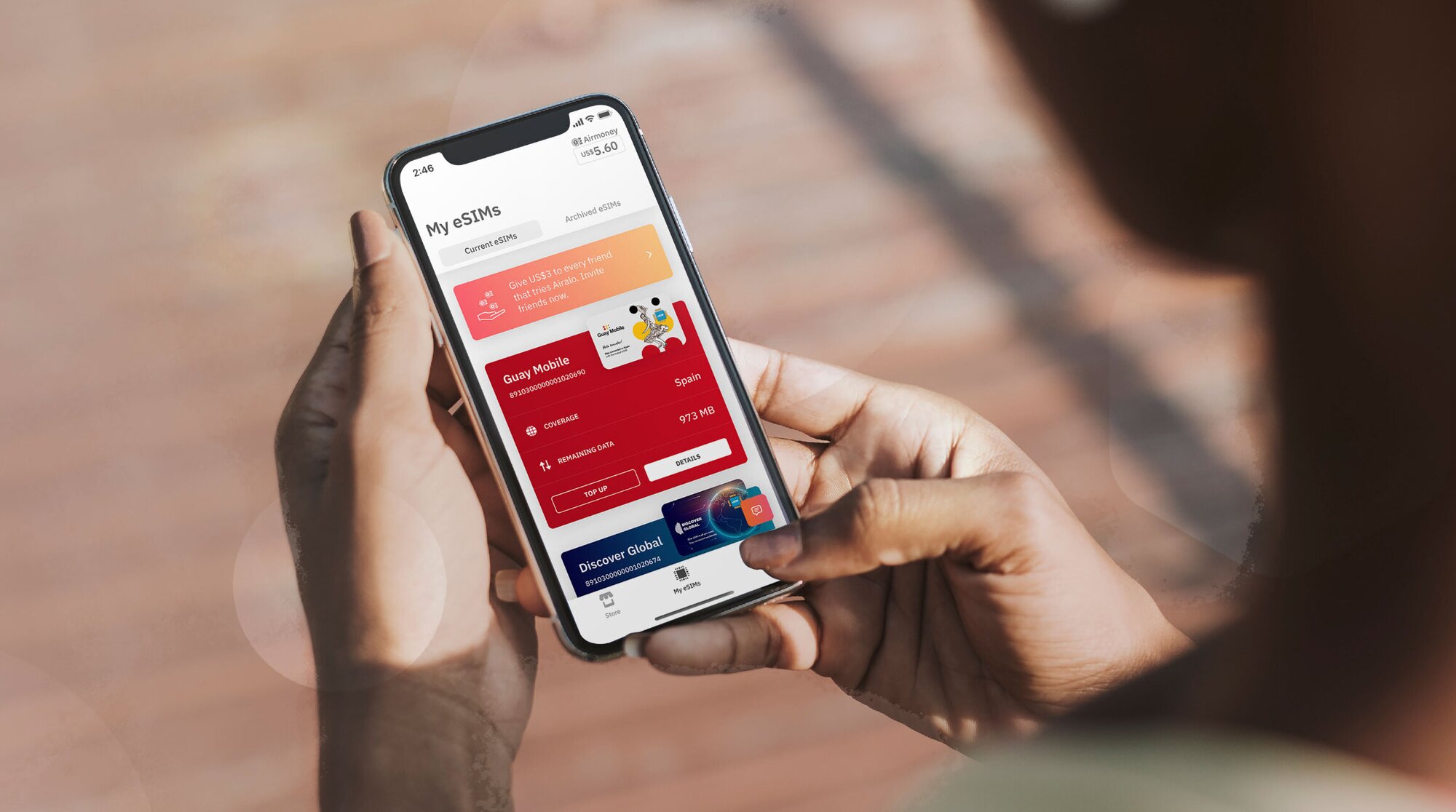
选择本地、区域或全球 Airalo eSIM
使用 Airalo eSIM 可让您连接全球 200 多个国家和地区。
更好的是,您可以根据您的旅行需求选择 eSIM 套餐。 选择以下之一:
- 本地 eSIM:如果您要前往一个目的地,选择本地 eSIM 是有意义的。 本地eSIM套餐可以覆盖一个国家/地区
- 区域 eSIM:无需切换 eSIM 即可跨境连接。 此类计划可为您提供特定地区多个国家的网路覆盖。 如果您正在进行跳岛游、欧洲之旅、 或非洲冒险,那么它是完美的选择!
- 全球 eSIM:如果您热衷于环游世界,全球 eSIM 是让您保持联系的完美解决方案。 全球eSIM套餐可以覆盖全球多个国家/地区
使用 Airalo eSIM 的好处
与传统 SIM 卡相比,eSIM 具有许多优势,例如即时旅行连接等。 使用 Airalo 的 eSIM 有很多好处,包括:
- 无漫游费。Airalo eSIM 计划是预付费的。 您只需支付预先购买或过程中充值的数据费用。
- 您不受特定运营商的约束。您可以选择最适合您需求的 eSIM 数据计划,并在旅行时轻松切换计划。
- 您可以像当地人一样连接。Airalo 与当地供应商合作,确保您在旅途中获得最优惠的价格和服务。
- 全天候联系我们。我们的客服团队全天候提供服务,因此无论您身在何处,都可以获得所需的帮助。

关于 Airalo eSIM 的常见问题解答
当您考虑使用 Airalo eSIM 满足您的旅行需求时,您可能会有一些疑问。
激活我的 eSIM 需要多长时间?
不花任何时间!
根据您的 eSIM 的激活策略,它将在您安装时立即激活或在您连接到目的地支持的网络时激活。
在这两种情况下,您都需要打开您的 eSIM 线路并连接到支持的网络才能使用您的 eSIM 数据。
我的套餐结束后,我需要重新激活我的 eSIM 吗?
不需要! 根据您购买的套餐,您的 Airalo 套餐中已经预加载了数据。 如果您的数据用完或有效期已过,您可以在 Airalo 应用程序中轻松充值。
如果您的 eSIM 套餐没有充值选项,您可以下载另一个 eSIM 套餐以保持连接。
我可以用我的 Airalo eSIM 做什么?
您可以使用 Airalo eSIM 执行与传统 SIM 相同的操作,包括:连接到移动网络、浏览互联网、使用您最喜爱的应用程序以及使用基于互联网的通话和消息应用程序(如 微信/WhatsApp)。
我可以同时使用 SIM 卡和 eSIM 吗?
当然可以! 大多数设备允许您同时使用多个 SIM 卡和/或 eSIM 。 您可以使用家庭网络 SIM 卡拨打电话和发送短信,使用 eSIM 使用网路数据。
如果您对如何激活 eSIM 仍有疑问,请访问我们的帮助中心或发送电子邮件至[email protected]。
想要使用 eSIM 在旅途中保持连接吗? 浏览Airalo eSIM以连接 200 多个国家和地区。
Step 2: Install Your eSIM
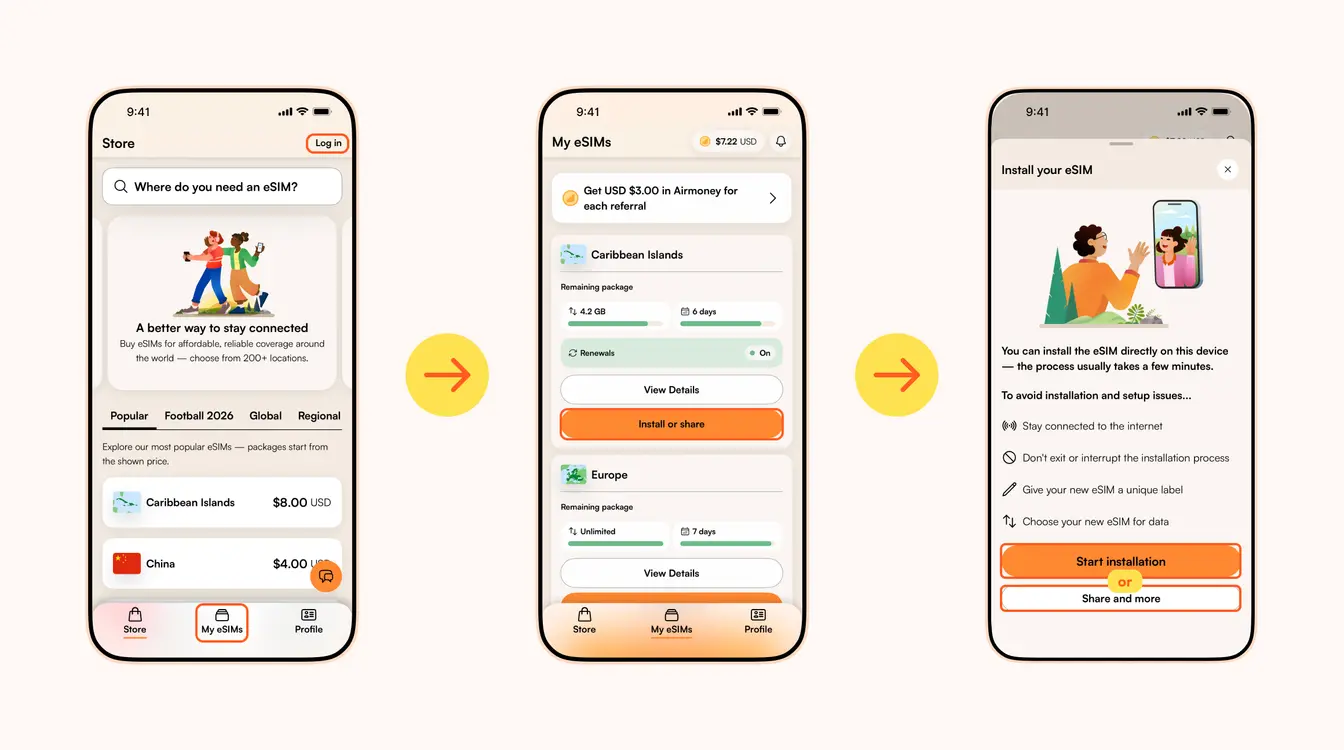
Once you've purchased your eSIM, you can choose to install or share the eSIM. If it's for your own use, select Start installation. Remember, you'll need a stable Wi-Fi connection for this.
Here are three different methods to install an Airalo eSIM:
- Direct: This is the most straightforward option. Go to your eSIM in the Airalo app, select Install or share → Start installation and follow the step-by-step prompts.
- QR Code: Use a QR code to start the installation process on another device. You can find more information under Install or share → Share and more.
- Manual: Enter your eSIM details manually in your device's Settings section. You can find more information under Install or share → Share and more.
For details on how to install your eSIM on a specific phone, follow the steps outlined in these links:
- iOS/iPhone eSIM guide
- Android eSIM guide
- Samsung Galaxy S20/S21 eSIM guide
- Google Pixel eSIM guide
- Huawei eSIM guide
Pro Tip: As you follow the installation steps, you'll be prompted to label your eSIM. For example, if you're visiting Japan, you can label your line as "Japan eSIM" to distinguish between your primary SIM and your eSIM. It makes switching between your eSIMs and turning them on and off easier — especially when using your SIM card for calls and texts, and your eSIM for data.
Step 3: Activate/Connect to Your Destination's Network
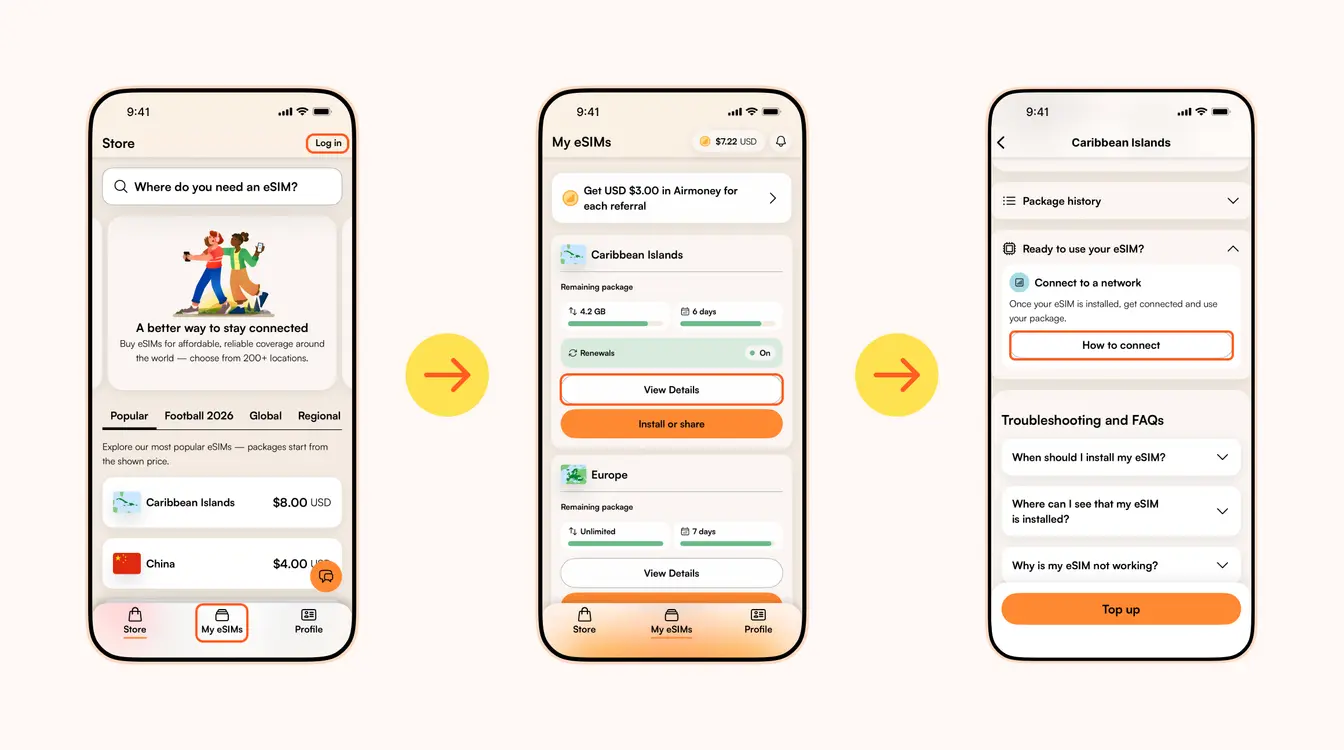
When should you activate/connect your eSIM?
Once you've installed your eSIM over Wi-Fi, the next step is to connect your eSIM. If you want to connect automatically on arrival, follow the steps below before you take off for your trip. Otherwise, you can do so once you arrive at your destination (you don't need a Wi-Fi connection for this step).
Follow the steps below to connect your eSIM to a network:
1. Go to the Airalo app
2. Navigate to My eSIMs → Your eSIM → View details → Ready to use your eSIM → Connect to a network → How to connect.
There, you'll find the exact steps you need to follow, but read on for a quick summary.
Here's how to turn on your eSIM line on iPhone:
- Go to Settings.
- Tap Cellular/Mobile Service.
- Select your new eSIM, if it hasn't already been selected.
- Toggle on Turn On This Line.
- Toggle on Data Roaming (if required in How to connect).
- Return to the main Cellular/Mobile Service menu.
- Tap Cellular Data/Mobile Data.
- Choose your eSIM.
- If your package includes calls and texts, tap Default Voice Line and choose your eSIM there as well.
Here's how to do it on Android:
- Go to Settings.
- Tap Network & Internet.
- Tap Mobile Network.
- Turn on your eSIM.
- Turn on Mobile Data.
- Turn on Data Roaming (if required in How to connect).
In case your eSIM does not connect to a network, try turning your phone off and on, or enable airplane mode for 10 seconds to refresh the network connection.
Important:
- To avoid being charged for roaming fees, you'll also want to turn off your carrier's data service. You can read how to do this here.
- If you're using a Global eSIM or a regional eSIM that includes your home country, do not activate it before you travel. Otherwise, it may activate in your home country, causing the validity period to begin before your trip.
- If your eSIM supports multiple networks, you can manually select the network you want to use. Check the supported networks for your eSIM in the Airalo app.
You can also follow our troubleshooting steps or contact our 24/7 help support.
转到 Airalo 帮助中心获取更多支持信息。
在 WhatsApp 上打开与 Airalo 支持团队的聊天。
Looking to use an eSIM to stay connected during your trip? Browse Airalo eSIMs to connect in 200+ destinations.